August 10, 2026 4 min read

How to Pick EHS Software: Steps, Costs, and Key Questions
Industry:
Solution:
You bought the software and finished implementation. Six months later, corrective actions are still open. The incident was logged. But the retraining that should have followed never got assigned. That’s the gap most EHS software reviews never catch.
Most selection processes focus on what a platform tracks. They miss what it closes. Knowing how to pick EHS software means checking the full workflow. That means going from incident report to corrective action to verified training completion.
EHS software that can’t connect a corrective action to a training assignment leaves a compliance gap open. Build your review around that incident-to-training loop. You’ll avoid the repeat incidents that feature-focused buyers often inherit.
Main Takeaways
- Lock down your must-have criteria before any demo. Filter first for incident closure, OSHA recordkeeping, and corrective action tracking.
- Total cost of ownership includes implementation, data migration, training, and contract escalators that rarely appear in the initial quote.
- EHS software falls into three tiers: point solution, mid-market suite, and enterprise platform. Each matches a different size and regulatory complexity.
- Demo scenarios pulled from your own operation expose platform gaps that vendor slide decks never will.
- If a corrective action can’t trigger a training assignment and verify completion, the compliance gap stays open.
Build Your EHS Software Criteria Before Any Demo
This guide covers must-have EHS features, pricing factors, and what separates platforms that track incidents from ones that close them.
Read the EHS Software Guide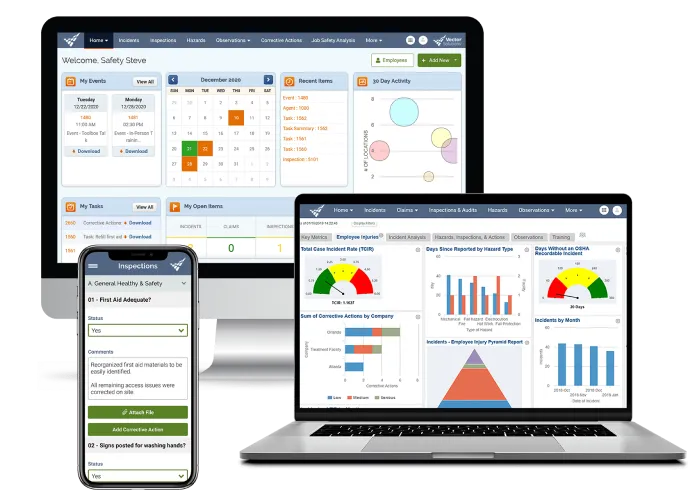
Map your EHS software selection criteria
Your EHS software selection criteria should be locked down before you ever see a demo. These criteria fall into two tiers. The first is must-haves that directly support compliance and incident closure. The second is nice-to-haves that add value but should never override a gap in the essentials.
Must-have vs. nice-to-have features
Start by identifying who belongs on the evaluation team:
- Your EHS lead
- Someone from IT to cover integration and security needs
- An operations rep who understands workflow fit
- At least one frontline worker who can reality-check usability
Document the regulatory duties your software must support. These include OSHA recordkeeping, EPA requirements, and any ISO 45001 alignment. Under OSHA’s 2024 electronic recordkeeping rule, certain sites must now submit case-level 300 and 301 data. Sites with 100 or more employees in listed high-hazard industries must file by March 2 each year. Those duties become your non-negotiable feature filter.
Non-negotiable EHS software features directly support regulatory compliance, incident closure, and frontline data capture. Any platform missing one of these creates a gap your team must fill by hand. That gap will go unfilled over time.
- Incident management and OSHA recordkeeping, captures events and generates the logs regulators require
- Audits and inspections scheduling, keeps your inspection cadence on track without manual calendar work
- Hazard reporting, gives frontline workers a fast path to flag risks before they become incidents
- Corrective action tracking and assignment, ties every finding to an owner, a deadline, and a confirmed close-out
- Compliance reporting and document control, manages SDS records, GHS labels, and audit-ready documents
- Mobile access with offline capability, 76% of organizations cite connectivity issues as a barrier to mobile EHS app usage, according to EHS Today, making offline sync a must-have for field teams
- Integrations (HRIS, ERP, LMS/training system), syncs employee data, financial tracking, and training assignments without manual handoffs
Nice-to-haves add value but should never tip a decision when a must-have gap exists:
- ESG and sustainability reporting, useful for organizations with environmental disclosure requirements
- AI-powered analytics and predictive insights, promising for trend spotting, though most deployments are still pilot-stage
- Custom executive dashboards, helpful for leadership visibility but not a compliance driver
- Advanced permit-to-work workflows, valuable in process-heavy environments but not universal
Draw this line before you see a single demo. It prevents the most common buyer mistake. Teams choose software because a feature looks impressive. Then they find it doesn’t cover the compliance and incident-closure needs they actually have.
Understand total cost of ownership and EHS software pricing
Total cost of ownership is the full price of buying, running, and maintaining EHS software over its contract life. It’s the number that separates informed buyers from ones blindsided by year-two invoices.
Pricing models and hidden costs
EHS software typically follows one of three pricing models. Per-user pricing charges a fixed rate for each person who accesses the platform. Costs are easy to forecast for a defined user base but grow as headcount rises. Per-site pricing charges a flat rate per location, no matter how many workers log in. It works better for multi-site operations with variable user counts. Per-module pricing lets you pay only for the areas you need. But costs add up fast as you turn on more features.
Beyond the subscription, buyers often miss these costs:
- Implementation and configuration fees
- Data migration from legacy systems or spreadsheets
- Admin and end-user training
- Professional services for custom workflows
- Annual price escalators written into multi-year contracts
- Third-party integration fees
Budget pressure makes every hidden dollar count. According to the Verdantix 2025 Global Corporate EHS Survey, 28% of EHS leaders plan budget increases of 10% or more. Another 31% are holding flat. Each surprise cost weakens the business case you built to get approval.
EHS software tier comparison
EHS software falls into three broad tiers. The right one depends on your organization’s size, regulatory complexity, and integration needs. Use this comparison to narrow your shortlist before requesting demos.
| Tier | Best-fit company size | Typical price range | Implementation timeline | Best-fit use case |
| Point solution | Small (under 100 employees) | $5K–$25K/year | 4–6 weeks | Single-site operations needing core incident and inspection tracking |
| Mid-market suite | Mid-size (100–1,000 employees) | $25K–$100K/year | 8–16 weeks | Multi-site organizations with OSHA reporting, corrective actions, and integration needs |
| Enterprise platform | Large (1,000+ employees) | $100K–$500K+/year | 4–6 months | Complex, multi-division operations with global regulatory requirements and deep ERP/HRIS integration |
The best EHS software for your organization is the tier that matches your current needs and can scale with you. Choosing the platform with the most features or the lowest sticker price usually leads to the same outcome: a tool that doesn’t fit.
When you present the cost of software to leadership, pair it with the financial exposure of doing nothing:
- The average medically consulted workplace injury costs $43,000. Preventing even a handful of recordable incidents can offset annual software costs, according to the National Safety Council.
- A single serious OSHA violation carries a maximum penalty of $16,550. Willful or repeat violations reach $165,514 per instance, per OSHA.
- The median days-away-from-work case runs 8 days away from the job, according to BLS. Overtime, replacement labor, and schedule disruption add up across your recordable count.
- Manual tracking with spreadsheets doesn’t scale and creates audit risk. Software is a risk-reduction investment, not an optional spend.
See How Incidents Connect to Corrective Actions
Vector EHS Management links incident reports, corrective actions, and training assignments in one platform. Assess whether that workflow fits your operation.
Explore Vector EHS Management Software
Run a structured EHS software evaluation
A structured EHS software evaluation uses real-world scenarios, consistent scoring, and a thorough vendor-questions list. It’s how you separate software that demos well from software that works in your operation.
How to structure your vendor demo
Run three to four scenarios pulled from your operation during every vendor demo. Good test scenarios include:
- A recordable incident that triggers a corrective action
- A scheduled inspection with findings
- A near-miss report submitted from a mobile device in the field
These will expose more about a platform’s real capability than any slide deck. Score each vendor on the same rubric: features, ease of use, integration capability, and implementation support.
Your demo must include hands-on time for frontline workers. Don’t settle for an admin walkthrough. A 2025 Verdantix analysis found that 19% of EHS decision-makers now rank user interface as the top selection factor. If field workers can’t navigate the app quickly, your data quality will collapse.
Questions to ask every EHS software vendor
These questions expose gaps between what a vendor shows in a demo and what you’ll experience after go-live.
Implementation and onboarding
- What does your typical implementation timeline look like for an organization our size?
- What are the three most common reasons EHS software rollouts fail, and how do you reduce them?
- Who handles data migration from our current system, and what does that process involve?
- Do you provide dedicated onboarding support, or is it self-service?
Pricing and contracts
- Is your pricing per-user, per-site, or per-module?
- What costs fall outside the base subscription (implementation, training, integrations, professional services)?
- Are there annual price escalators in your standard contract?
- What happens to our data if we choose not to renew?
Integrations and data
- Does your platform integrate with our HRIS and ERP systems?
- Does your system connect to a training or LMS platform so corrective actions can trigger training assignments?
- Can we export OSHA 300/301 data for electronic submission?
- How does your mobile app handle offline data capture and sync?
Support and scalability
- What does your post-launch support model look like (dedicated CSM, ticket-based, tiered)?
- How do you handle regulatory updates? Are forms and workflows updated on their own?
- Can the platform scale from a single site to multi-site without re-implementation?
- What adoption metrics do you track, and will you share benchmark data from similar organizations?
The training integration question most buyers miss
EHS software connects to training when a corrective action can trigger a training assignment in a linked LMS. The system then verifies completion before the action is closed. Without that link, retraining becomes a manual follow-up that often falls through the cracks.
The workflow gap is simple. An incident occurs and triggers a corrective action. That corrective action often requires retraining on a procedure, a piece of equipment, or a regulatory topic. If your EHS software and your training system are separate tools, the training assignment becomes an email someone has to remember to send. The corrective action stays open. So does the compliance gap.
OSHA’s incident investigation guidance tells employers to fix the root cause behind an incident, not just the surface trigger. Retraining is one of the most common corrective actions a root-cause analysis produces. That’s exactly why the training assignment can’t depend on someone remembering to send it.
Ask every vendor this question: “Does your EHS software assign training when a corrective action is created? Can it verify completion before closing the action?” Platforms like Vector EHS Management connect incident reports directly to training assignments in Vector LMS. Corrective actions don’t sit in a queue waiting for someone to remember the follow-up.
Start closing compliance gaps with Vector Solutions
You now have a framework for evaluating EHS software around what matters. Can the platform close the incident-to-training loop? That loop keeps repeat incidents from piling up.
We built Vector EHS Management to connect incident reports to training assignments in Vector LMS. When a corrective action requires retraining, the assignment happens on its own. Completion is verified before the action closes. Every location runs the same safety workflows on time.
You can show leadership the results: fewer repeat incidents, closed corrective actions, and audit-ready records in one platform.
Close the Gap Between Incidents and Retraining
Manufacturing teams using Vector EHS assign corrective training directly from incident reports, with completion verified before the action closes.
Request a demo today
FAQs about how to pick EHS software
What’s the difference between per-user and per-site EHS software pricing?
Per-user pricing charges a fixed rate for each employee on the platform. Costs are easy to forecast for a set user base. But they rise as headcount grows. Per-site pricing charges a flat rate per location, no matter how many workers log in. It fits multi-site operations better, especially where daily platform use varies.
How long does EHS software implementation typically take?
Most mid-market deployments take 8 to 16 weeks from contract signing to full rollout. That covers configuration, data migration, admin training, and frontline pilot testing. Point solutions for single-site operations can go live in 4 to 6 weeks. Enterprise platforms with multi-site rollouts and legacy system integrations often require 4 to 6 months. Use these ranges to check whether a vendor’s timeline is realistic.
What integrations should EHS software have?
At minimum, EHS software should integrate with three systems:
- Your HRIS, to sync employee data and org structure
- Your training or LMS platform, to trigger and verify training assignments from corrective actions
- Your ERP or financial system, to track incident costs and workers’ comp claims
The LMS integration is the most commonly missed need. Without it, retraining after a corrective action becomes a manual follow-up that often falls through the cracks.
Do I need different EHS software for construction vs. manufacturing?
You don’t need industry-specific EHS software. You do need a platform configurable to your regulatory duties. Examples by industry include:
- Construction: OSHA 300 logs and subcontractor management
- Manufacturing: process safety and GHS chemical management
- Healthcare: bloodborne pathogen tracking
Most mid-market and enterprise platforms are built to work across industries. The key question is whether forms, workflows, and compliance reporting can be customized to match your needs without custom development.
Can EHS software replace my current training system?
Most EHS software platforms don’t replace a full training system. They track corrective-action-triggered retraining. But they lack the course authoring, compliance tracking, and learning management features of a dedicated LMS. If your current training system handles regulatory compliance training well, look for EHS software that integrates with it. Platforms like Vector Solutions offer both EHS management and an LMS in one ecosystem. That removes the integration gap without losing features in either area.