
November 23, 2026 6 min read

Skills Matrix: What It Is, How to Build One, and Examples
Industry:
Solution:
A technician finished the forklift course last month, so the schedule says they’re cleared to run the dock. Nobody watched them do it. A completed course shows someone sat through the content. It doesn’t show they can do the job.
A skills matrix closes that gap. It’s a grid that maps people to skills by proficiency level, so you can see who’s qualified for each role and shift. It only works when every rating rests on evidence, not self-scores or course completions alone. This guide covers how to build one in five steps, how to spot single points of failure, and when to move beyond a spreadsheet.
Main Takeaways
- A skills matrix maps people to skills by proficiency, so you can see qualified coverage by role and shift.
- A critical skill held by only one person is a single point of failure, and the grid shows it right away.
- Every rating of 2 or 3 needs recorded evidence, such as observation, a practical assessment, or supervisor sign-off.
- Build one in five steps: scope roles, define skills, set the scale, assess with evidence, and act on gaps.
- Assign an owner, review on a set schedule, and update after events like new hires, role changes, or expiring certifications.
What Is a Skills Matrix?
A skills matrix is a grid that shows which people hold which skills and how well they perform each one. It has three core parts. People or roles run along one axis. Skills or certifications run along the other. A proficiency rating sits in each cell where a person meets a skill, from no capability up to expert-level independence.
In most grids, each row is an employee or a role. Each column is a skill, certification, or qualification the work requires. Some teams add extra columns, such as an interest level that shows who wants to grow in a skill or the end date for each certification. These extras help, but the core model works without them.
A completed skills matrix shows three things at a glance: where the team is strong, where the gaps are, and where single points of failure hide. A single point of failure is a critical skill that only one person holds. A training log or roster can’t show you that. The snapshot pays off when you act on it by assigning shifts, targeting training, or flagging risks before they turn into incidents.
Why a Skills Matrix Matters
A skills matrix gives supervisors, L&D teams, and plant managers one shared view of who can do what. Staffing, training, and development choices then rest on data instead of memory and guesswork.
Gap View, Task Allocation, and Cross-Training
Thin coverage shows up as soon as the grid is filled in. You can spot skills that too few people hold and roles that depend on one person. Supervisors can then assign work based on verified capability, not just seniority or availability.
The same view tells you where to cross-train first. Columns with the weakest backup coverage carry the most risk, so training dollars should go there. Building capability from within also tends to pay off. A Workday report found that internal hires were 80% more likely than external hires to be rated top performers in their first review.
Who Benefits and How
Each group reads the matrix for a different decision:
- Operations leaders and plant managers see qualified coverage across shifts and sites, which helps them plan for retirements, turnover, and succession.
- L&D teams aim limited budgets at the skills that matter, which completion counts alone can’t show. Those budgets are tight: ATD reports that direct learning spend fell to $846 per employee in 2025, down from $1,254 in 2024.
- EHS teams track certification status and catch expiring qualifications before an audit does.
- Supervisors make daily shift-coverage calls with real data in hand.
- Employees see their own development path and the evidence they need to move up.
One evidence-backed matrix serves all five groups from a single source.
How a Skills Matrix Works in Factory and Shift-Based Work
On the factory floor, a skills matrix shows whether each shift has enough qualified people. Here, the grid carries real production and safety stakes.
Shift Coverage and Single Points of Failure
Open roles and turnover put shifts at risk. When only one person on a shift holds a required skill or certification, that role becomes a single point of failure. Workforce pressure hasn’t gone away: in the National Association of Manufacturers’ (NAM) Q2 2026 survey, 47% of manufacturers still named attracting and retaining a quality workforce as a top business challenge. Tools like a skills matrix are part of how teams close the manufacturing skills gap.
A skills matrix flags these gaps shift by shift. A supervisor can see that second shift has one trained forklift operator and act right away by cross-training, adjusting schedules, or moving people. That way, one vacancy won’t halt production or create a safety risk.
Cross-Training, Certifications, and Cost Avoidance
Losing a skilled worker is expensive. In a UKG Workforce Institute survey, most manufacturing HR leaders put the average cost to replace a skilled frontline employee at $20,000–$40,000. Cross-trained backups reduce that risk because the work keeps moving while you backfill. The same logic applies to the industrial maintenance skills gap, where one retirement can take years of know-how with it.
A skills matrix can also track certification end dates for forklift, Hazard Communication (HazCom), and lockout/tagout (LOTO). That lets you schedule retraining before a qualification lapses. The stakes are real: HazCom ranked second on OSHA’s preliminary FY 2025 list of most-cited standards, with 2,546 citations, according to OH&S.
At the plant level, staffing risk becomes a number you can manage: qualified people per shift, per skill. You see it on the grid long before an auditor or an incident points it out.
Skills Matrix Example: What a Finished Form Looks Like
A finished skills matrix reads two ways. Scan across a row to see one person’s full capability. Scan down a column to see how well the team covers a single skill.
Manufacturing Line Example
Here’s a skills matrix example for a factory line. The rows list four operators, and the columns list five skills. Each cell holds a rating from 0 to 3, where 0 means no capability and 3 means the person can train others.
| Operator | CNC Setup | Quality Inspection | Forklift Operation | HazCom Compliance | Line Changeover |
| Operator A | 3 | 2 | 0 | 2 | 3 |
| Operator B | 2 | 3 | 1 | 2 | 1 |
| Operator C | 1 | 1 | 2 | 3 | 2 |
| Operator D | 0 | 1 | 1 | 1 | 0 |
| Qualified Coverage (Rated 2+) | 2 | 2 | 1 | 3 | 2 |
Start with the bottom row. Any column with only one rating of 2 or 3 is a risk, so forklift operation needs a backup first. Then scan the rows. Operator D has mostly 0s and 1s, which is the pattern of a new hire who needs a training plan.
Field Service Team Example
The same structure works for a field service team. Here, the rows list four technicians, and the columns list skills that matter on customer sites.
| Technician | Fault Diagnosis | Field Install | Permit-to-Work | Electrical Safety (LOTO) | Customer Service |
| Tech A | 3 | 2 | 2 | 3 | 1 |
| Tech B | 2 | 3 | 1 | 2 | 2 |
| Tech C | 1 | 1 | 1 | 1 | 3 |
| Tech D | 0 | 1 | 0 | 1 | 2 |
| Qualified Coverage (Rated 2+) | 2 | 2 | 1 | 2 | 3 |
Permit-to-work is the single point of failure here, since only Tech A is qualified. If they’re on leave, no one else can sign off on high-risk jobs. Tech C shows a different pattern: strong with customers but light on technical skills, which makes them a good fit for structured cross-training. For teams that cover large areas, read coverage by region too, so each territory has a qualified tech.
You can adapt either layout as a skills matrix template for your own team. Most teams start it in Excel or a shared sheet.
Build a Manufacturing Training Matrix That Holds Up
A manufacturing training matrix maps operator qualifications by station and tracks certification expiry dates, so supervisors can see coverage at a glance. This guide covers every step, from competency families to audit-ready records.
Read the Manufacturing Training Matrix Guide
Four Proficiency Levels and How to Define Them
Many skills matrices use a four-level scale that runs from no capability to the ability to train others. The scale only holds up when each level is tied to behavior you can observe.
Labels like “beginner” and “expert” mean different things to different managers. One site’s expert is another site’s competent operator. Behavioral descriptors fix that by linking each level to something you can watch or verify.
| Level | Label | Behavioral Descriptor | Supervision or Validation Requirement |
| 0 | No capability | Has never performed the skill | Can’t be assigned until trained and validated |
| 1 | Learning / needs supervision | Handles basic tasks and has started training, but isn’t yet independent | Works only under direct supervision |
| 2 | Competent / independent | Performs the skill to standard without help | Validated through observation or sign-off |
| 3 | Expert / can train others | Works at the highest level and solves edge cases | Qualified to train and assess others |
Some teams add a separate “willing to learn” column. That interest signal is separate from proficiency, and it helps L&D pick strong cross-training candidates.
Any rating of 2 or 3 should require recorded evidence, such as observation, a practical skills assessment, or supervisor sign-off. A self-score or course completion doesn’t meet that bar. With a shared, evidence-backed scale, the matrix becomes a tool you can rely on.
How to Build a Skills Matrix in Five Steps
You can build a skills matrix in five steps: scope the roles, define the skills, set the scale, assess people with evidence, and act on the gaps.
Step 1: Scope Your Roles and Team
Start with one team, department, or production line. A company-wide rollout is too big for a first pass. List every role that needs coverage, and break it out by shift if you run more than one. Then decide what your rows will be. Individual names give you a shift-level view, while role titles work better for workforce planning across sites.
Step 2: Define Required Skills per Role
List the skills each role needs to do the job. Include technical skills, certifications, safety qualifications, and core job competencies. Add a few people skills, such as communication or coaching, when the role depends on them. Pull these from job descriptions, SOPs, and regulatory requirements such as OSHA and EPA rules, then check the list with supervisors who know the work. Keep each role to 8–15 skills at first, because a matrix with 40 columns quickly becomes too big to maintain.
Step 3: Set Your Proficiency Scale
Choose your proficiency scale and write it down. You can use the 0–3 scale above or adapt it to your own language. Either way, every level needs a behavioral descriptor and a validation rule. Store the scale in one shared reference so every assessor rates the same way on every shift and at every site.
Step 4: Assess Current Levels with Evidence
Rate each person on each skill, and back every score with evidence. Use supervisor observation, practical demonstrations, sign-off records, and certification records. Self-ratings are a fine starting point, but someone who has watched the work must confirm them.
Course records have the same weakness. Brandon Hall Group reports that over 25% of learning never translates into workplace performance. That’s why it helps to use tests that match your learning objectives and to validate the skill on the job.
Step 5: Identify Gaps and Prioritize Action
Review the finished matrix one column at a time. Flag any skill where fewer than two people rate 2 or higher, since each of those is a single point of failure. Tackle safety-critical, production-critical, and compliance-required skills first. Then write a simple action plan that names who needs training, in which skill, by what date, and what evidence will confirm the target level.
See Qualified Coverage Across Every Shift and Site
When a spreadsheet can't show who's qualified right now, staffing calls rely on memory. Vector Skills Intelligence gives leaders a live view of capability, gaps, and single points of failure across roles, teams, sites, and shifts.
Explore Vector Skills Intelligence
Training Completion vs. Demonstrated Capability
A completed course shows someone was exposed to the content. Only performance on the job shows they can do the skill safely and on their own.
Why Course Records Overstate Readiness
Four kinds of evidence usually feed a skills matrix, and each deserves a different level of trust:
- Training record: Shows a course was finished.
- Self-assessment: Reflects the person’s own claim.
- Manager review: Reflects what the manager believes.
- On-the-job validation: Means someone watched the person do the work to standard.
Training records give the weakest signal of real capability, and hands-on validation gives the strongest. Since training completion doesn’t prove readiness, the fix is a clear validation step.
How to Validate Skills with Evidence
A simple three-stage model keeps ratings tied to proof:
- Learn: The person completes the required training, such as a course, module, or on-the-job training (OJT) session.
- Validate: The person demonstrates the skill through observation, a practical assessment, or supervisor sign-off, and someone records the evidence.
- Deploy: The person goes on the matrix at the validated level for that skill.
In regulated settings, recorded sign-off is often what auditors ask to see. A matrix that links training records to validation evidence closes the gap between “trained” and “qualified.” Vector Skills Intelligence connects each gap to training tracked in the LMS or to the right validation step. Sign-offs can range from a quick approval to a multi-step chain with digital signatures.
Skills Matrix vs. Training Matrix vs. Competency Matrix
A skills matrix shows whether someone can perform specific tasks at a set proficiency level. A training matrix shows which courses and certifications each person has completed or still needs. A competency matrix maps the broader behaviors and knowledge behind many tasks. The three overlap, but each supports a different decision.
People often use the terms interchangeably, and some teams combine them. The comparison below shows what each one measures and when to use it.
| Dimension | Skills Matrix | Training Matrix | Competency Matrix |
| What It Measures | Specific, observable task proficiency | Courses and certifications completed or due | Broader behavioral and knowledge competencies |
| Typical Grain | Individual tasks or certifications | Individual courses, with due and expiry dates | Role-level clusters of capability |
| Best For | Shift coverage, task assignment, cross-training | Compliance tracking and retraining schedules | Development planning, succession, performance reviews |
| Rating Basis | Observed performance or sign-off | Completion records | Assessments, 360-degree feedback, portfolio evidence |
| Update Trigger | Certification expiry or a newly validated skill | New assignment, completion, or expiry | Performance cycle or role change |
What About the Skill/Will Matrix?
The Skill/Will Matrix is a separate 2×2 coaching tool. It plots one person’s skill on a task against their motivation, or will, to do it. Managers use it to decide whether to direct, coach, delegate, or motivate. A skills matrix plans capability across a whole team, while the Skill/Will Matrix helps you decide how to manage one person.
So the right tool depends on the question. To learn who can do a task right now, use a skills matrix. To see who’s trained or due for retraining, use a training matrix. To find who’s ready for a bigger role, use a competency matrix. To decide how to manage one person on one task, use a Skill/Will Matrix.
When a Spreadsheet Stops Working
A spreadsheet is a sound place to start a skills matrix. Once your team outgrows a single tab, though, it becomes a liability.
For one team of 10–20 people with a stable skill set, Excel or Google Sheets works well. It’s free, familiar, and quick to set up. Our guide to choosing between Excel and software for a training matrix covers where that line usually falls.
Problems start as the matrix grows:
- Copies multiply until nobody knows which version is right.
- Certifications lapse because nobody checks the dates in time.
- Each site keeps its own sheet, with no rollup across locations.
- No audit trail shows who changed a rating or when.
- Training records and validation evidence live in separate places.
These gaps are a big part of why spreadsheets create readiness gaps. A 2024 literature review in Frontiers of Computer Science found that faults often exist in operational spreadsheets and can “severely compromise” the decisions based on them.
A few signs tell you it’s time for a live system: you run more than one site, you manage more than 50 people, you track regulated certifications with end dates, or audits demand records. Vector Skills Intelligence replaces the static file with a live qualification matrix you can view by role, team, site, or shift. Plan that move early, before the spreadsheet becomes the risk it was meant to prevent.
Common Mistakes That Make a Skills Matrix Unreliable
Most skills matrices fail because of their data. The ratings are vague, out of date, or based on assumptions nobody checked.
Vague scales cause the first problem. Labels like “beginner,” “intermediate,” and “advanced” mean different things to each manager, so ratings drift between shifts and sites. The four-level table above solves this with behavior-based definitions.
Self-assessment bias and stale data follow close behind. Self-ratings swing both ways: some people rate themselves too high, especially on safety procedures, while others undersell what they can do. A matrix built on self-scores alone won’t hold up. Staleness does similar damage. A matrix updated once a year, or never, describes a workforce that no longer exists. New hires, role changes, and expired certifications make it wrong within weeks.
Unclear ownership ties these failures together. When nobody owns the matrix, nobody updates it. A common story is a matrix built for one project, shared once, and then forgotten because no one decided who keeps it accurate, how often, or what triggers an update.
Who Owns the Matrix: Governance and Update Cadence
A skills matrix stays reliable when three things are in place: one person or role owns it, reviews run on a set schedule, and specific events trigger updates between reviews.
Ownership Model
Ownership depends on the size of the operation. At a single site, the department supervisor or training coordinator usually owns the matrix. In multi-site organizations, a central L&D or workforce development lead owns the template and standards, while site supervisors own the data. The owner keeps ratings current and evidence recorded, and routes gaps to the person who can act on them.
Review Cadence and Off-Cycle Triggers
Review the matrix quarterly as a baseline. High-turnover sites and teams in a ramp-up period may need monthly reviews. Some events call for an immediate update:
- A new hire, role change, or shift change
- A certification that expires or renews
- An audit finding or a regulatory change, such as an update to OSHA’s Hazard Communication Standard
- New equipment or processes that require new skills
Governance sticks best when it rides on a meeting you already hold, such as a monthly safety meeting or a quarterly business review. Each review should produce two things: an updated grid and a short action list that names who needs training, in what skill, and by when.
Put Your Skills Matrix to Work with Vector Solutions
You now have what you need to build a matrix where every rating has proof behind it. You can see where coverage runs thin and decide who should train next. That turns the grid into a working tool for staffing, training, and compliance decisions.
A matrix you can trust has to stay current, and that’s hard to do in a static spreadsheet. Vector Skills Intelligence is built for teams that have outgrown one. It gives you a live view of qualified coverage across shifts and sites, captures sign-offs as evidence, and shows where cross-training will reduce the most risk.
Turn Skill Sign-Offs Into Audit-Ready Proof
When a sign-off goes unrecorded, the gap often shows up in an audit before it shows up in your matrix. See how Vector Skills Intelligence turns the skills documents you already have into a live matrix, with validation evidence behind each rating.
Request a Vector Skills Intelligence Demo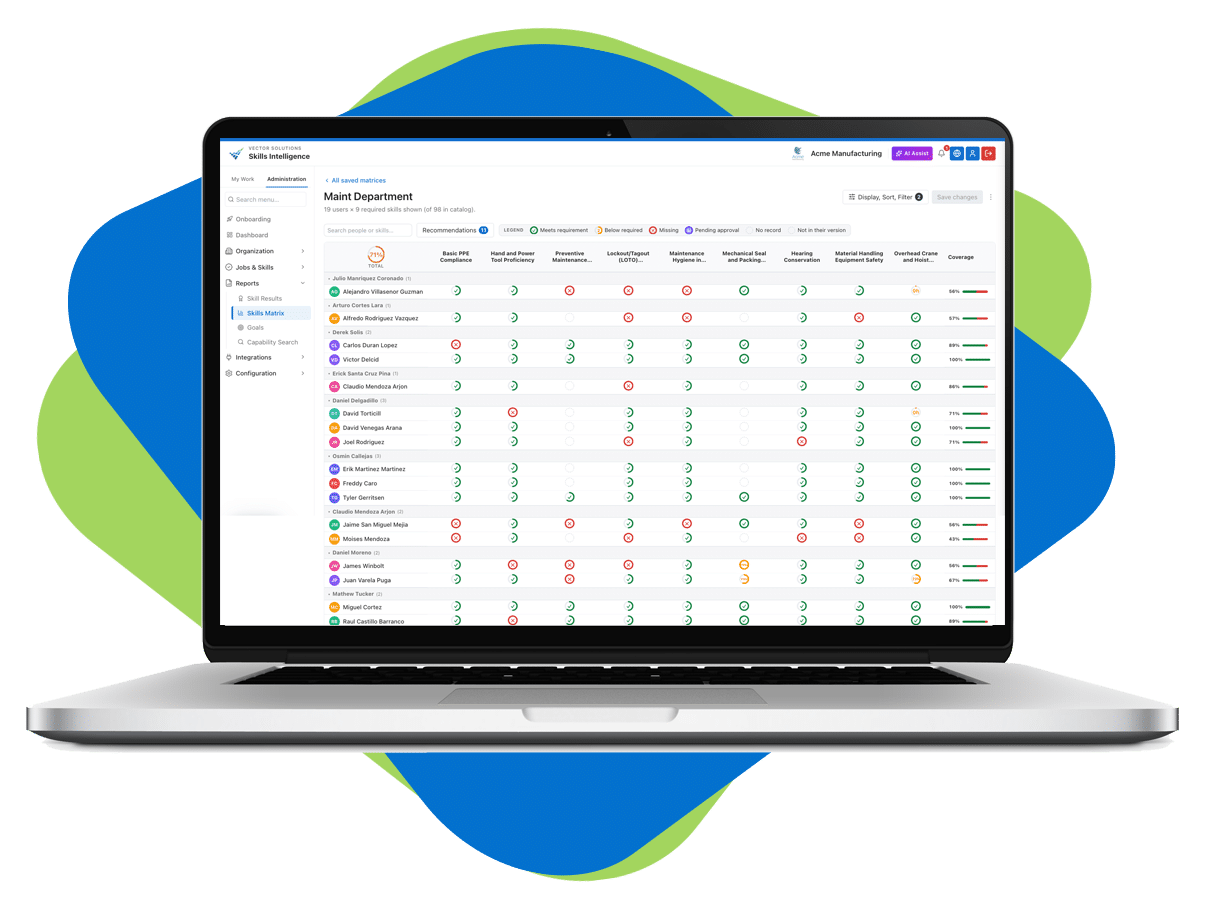
FAQs About Skills Matrices
How Is a Skills Matrix Different From a Training Matrix or Skills Inventory?
A skills matrix shows what people can do and at what proficiency level. A training matrix shows which courses or certifications each person has completed or still needs, usually with dates. A skills inventory is a broad list of the skills that exist across the workforce, without a structured grid or proficiency comparison. Many teams combine the skills matrix and training matrix, so a gap in a skill points straight to the training that closes it.
How Do I Choose Between a Skills Matrix and a Competency Matrix for My Team?
Choose a skills matrix when the decision is about daily work, such as who can run a task on this shift. Choose a competency matrix when the decision is about growth, such as who’s ready for a bigger role. Run both only if each has its own owner and update trigger. Otherwise, the second one will go stale first.
How Many Skills Should I Include Before the Matrix Gets Too Big?
Start with 8–15 skills per role. Focus on work where a missing qualification stops a shift or triggers a citation, which means safety-critical, production-critical, and compliance-required skills. Hold off on nice-to-have skills, and add columns only after the first review cycle shows the matrix is staying current. If ratings go stale between reviews or supervisors stop opening it, the matrix is too big.
How Do I Get Supervisors on Different Shifts to Rate People the Same Way?
Run a short calibration session. Have supervisors rate the same two or three employees against the behavioral descriptors, then compare scores and resolve differences before ratings go into the matrix. Require evidence, such as observation or sign-off, for any rating of 2 or 3. Have a second assessor spot-check a sample each quarter, and keep the scale and examples in one shared reference.
What Do I Do When a Certification Expires or Someone Fails a Hands-On Sign-Off?
Lower the person’s rating for that skill right away, to 0 or 1 based on your scale. Remove them from any assignment that requires it, and log a retraining and re-validation plan with a due date. Recheck qualified coverage for the affected shifts the same day. Restore the rating only after recorded re-validation, not after course completion alone.
How Do I Know My Skills Matrix Is Actually Working?
Track three signals and compare them quarter over quarter:
- The number of skills with fewer than two qualified people
- The share of ratings backed by recorded evidence
- The number of shifts that ran with required skills uncovered
If single-point-of-failure counts fall and audits find no expired qualifications, the matrix is driving decisions. Warning signs include ratings that haven’t changed in a full review cycle and supervisors who still assign work from memory.