July 1, 2026 6 min read
OSHA 301 Form: Requirements, Deadlines, & How to File
Industry:
Solution:
Knowing the details of OSHA Form 301 is key to staying compliant and keeping a safe workplace. This is especially important in high-risk fields like industrial manufacturing and construction. OSHA Form 301, known as the Injury and Illness Incident Report, is a key document. The Occupational Safety and Health Administration (OSHA) requires it to track workplace injuries and illnesses.
Employers use the OSHA 301 form to record details of a work-related injury or illness. This includes what happened, how it occurred, and basic information about the employee. The form helps companies follow safety and health standards. It also ensures they keep accurate records of injuries and illnesses.
This guide covers:
- What the form requires
- When it’s due
- How to file
- The equivalent-form and privacy rules that trip employers up most often
Main takeaways
- OSHA Form 301 is the Injury and Illness Incident Report. It records details about each reportable injury or illness. You must complete it within 7 calendar days of knowing a case is recordable, and keep it on file for 5 years.
- You can use any equivalent form that includes all five required field categories in place of OSHA form 301. This can be a state workers’ comp form, an insurance first report of injury, or an Excel or CSV spreadsheet.
- For privacy concern cases, like sexual assault, mental illness, or HIV, enter “privacy case” instead of the employee’s name on the 301 and 300 Log. Keep the actual name on a separate confidential list.
- Recordkeeping and reporting are different tasks. You must report fatalities to OSHA within 8 hours. For hospitalizations, amputations, or eye loss, you have 24 hours, in addition to the 301 form.
- Covered establishments file electronically through the ITA by March 2, not on paper. Establishments with over 100 employees in high-hazard industries must submit case-level 301 data. If they don’t, they risk citations. They may also face Site-Specific Targeting inspections.
New to OSHA Recordkeeping?
See how Forms 301, 300, and 300A fit together across the recordkeeping year, from first report to year-end posting.
Read the OSHA reporting forms guide
What Is OSHA Form 301?
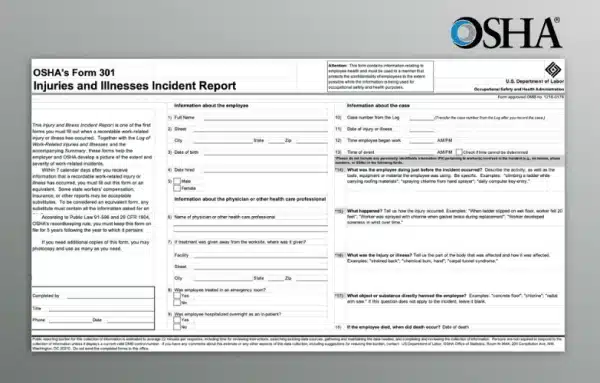
OSHA Form 301, also known as an Injury and Illness Incident Report, is a document used to record specific information about work-related injuries or illnesses. It provides a comprehensive account of each incident, including the injured employee’s details, the nature of the injury or illness, and the circumstances surrounding the incident.
Form 301 is a critical component of OSHA’s recordkeeping requirements. It helps employers track workplace incidents and identify trends to improve safety protocols.
The OSHA Form 301 captures:
- Basic employee information (name, job title, department)
- Date and location of incident
- Description of the injury or illness (body part affected, type of injury)
- Description of how the incident occurred
- The object or substance that directly harmed the employee
- Medical treatment received (if any)
- Physician or health care provider contact information
- Date of death, if the employee died
You can download the official fillable OSHA 301 form PDF directly from OSHA’s recordkeeping forms page. Form 301 also relates to the OSHA 300 and 300A forms.
Why OSHA Form 301 Matters: Injury and Illness Reporting
OSHA Form 301 is a key part of workplace safety. It helps employers organize all the important details about every injury or illness, giving them the critical data they need to enhance workplace safety.
By analyzing Form 301 data, employers can spot patterns and identify potential hazards before they turn into more serious issues. This analysis makes it easier for employers to create plans and take actions that can prevent future incidents.
That same data feeds your 300 Log and year-end totals. An accurate Form 301 also protects the reliability of your DART and TRIR rates across every site.
When do employers need to use an OSHA Form 301?
Employers with more than 10 employees are generally required to complete OSHA Form 301 for each recordable work-related injury or illness. There is an industry exemption for low-risk businesses. Recordable incidents include those that result in:
- Death
- Days away from work
- Restricted work
- Job transfer
- Medical treatment beyond first aid
- Loss of consciousness
- A significant diagnosis by a healthcare professional
Equivalent and substitute forms
You do not have to use the official OSHA form. Under 29 CFR 1904.29(b)(4), you can substitute another document as long as it captures every required data element. Acceptable options include a state workers’ compensation equivalent form, an insurance carrier’s first report of injury, or any other record that covers the same information. OSHA also permits equivalent forms in any file format, including an Excel or CSV spreadsheet.
Before relying on a substitute, confirm it covers all five required field categories:
| Required field category | Covered? |
| Employee information (name, title, address, DOB, hire date) | ☐ Yes / ☐ No |
| Incident details (date, time, location) | ☐ Yes / ☐ No |
| Task description (activity, tools or materials involved) | ☐ Yes / ☐ No |
| Injury or illness description (body part, nature, cause, how it occurred) | ☐ Yes / ☐ No |
| Treatment information (provider, facility, ER or hospitalization) | ☐ Yes / ☐ No |
A blank field is a citable gap during an audit, whether you use the official form or a substitute.
Employer Requirements for OSHA Form 301
Form 301 must be completed within 7 calendar days of learning about a recordable injury or illness. It serves as the incident-level detail behind the log of work-related injuries and illnesses. It must be readily available for review by OSHA inspectors upon request.
Employers must retain it for a minimum of 5 years following the end of the calendar year that the records cover.
OSHA Form 301 includes multiple sections that require specific information:
- Information about the employee: This section captures the injured worker’s name, location, date of birth, gender, and date of hire, providing a personal profile for each incident.
- Information about the case: This section captures key information about the incident, including the date and time of the incident, the task the employee was performing, and a detailed description of how the injury or illness occurred. This helps in understanding the sequence of events leading to the incident.
- Information about the physician or other health care professional: This section includes details about the medical treatment received and whether the employee was hospitalized.
- Certification: The form must be certified by a company official, ensuring the accuracy and completeness of the information provided.
Sensitive employee medical details can only be shared with OSHA or authorized representatives.
Safety Incident Management Software can streamline this workflow by capturing incident details, supporting review processes, and helping identify trends across OSHA 301 and 300 records.
Safety Incident Management Software
Manage your safety program with tools to report and track safety incidents, address open issues, and prevent similar incidents before they happen.
Learn More
Privacy concern cases
Some cases require that you leave the employee’s name off both Form 301 and the 300 Log. OSHA calls these privacy concern cases. They include:
- An injury or illness involving an intimate body part or the reproductive system
- Sexual assault
- Mental illness
- HIV infection, hepatitis, or tuberculosis
- A needlestick or sharp-object injury involving another person’s blood or infectious material
- Any other illness where the employee asks that their name not be recorded
When a case qualifies, follow a two-part rule. Enter “privacy case” in place of the name on Form 301 and the 300 Log, and keep a separate confidential list that links each case number to the actual name.
Differentiating OSHA Form 301 from Other OSHA Forms
While OSHA Form 301 is focused on individual incident reporting, it is typically connected with other OSHA forms as well:
- OSHA Form 300: This form logs all recordable work-related injuries and illnesses throughout the year. It serves as a summary document that aggregates data from Form 301.
- OSHA Form 300A: This form provides an annual summary of the incidents logged on Form 300. It must be posted in the workplace from February 1st to April 30th, allowing employees to review the company’s overall safety performance.
| Form | Purpose | Scope |
| Form 301 | Incident-level report | Each individual recordable injury/illness |
| Form 300 | Log of Work-Related Injuries and Illnesses | Running log of all incidents in a calendar year |
| Form 300A | Summary of Work-Related Injuries and Illnesses | Annual summary, posted for employees |
Reporting severe incidents to OSHA
Recordkeeping is separate from severe-incident reporting. Every employer must report serious events to OSHA quickly, no matter the size or industry. This includes any work-related fatality within 8 hours and any in-patient hospitalization, amputation, or loss of an eye within 24 hours. You can meet this duty by calling OSHA or using its online reporting form. This obligation exists alongside Form 301, not in place of it.
Submitting Form 301 data to OSHA
Completing the form is only half the task. Covered establishments must send recordkeeping through the Injury Tracking Application (ITA). OSHA does not accept paper forms by mail or forms emailed to the agency.
The electronic filing rule follows a tiered structure:
- Establishments with 20–249 employees in designated high-hazard industries submit Form 300A data by March 2 each year.
- Establishments with 100+ employees in those same industries submit Form 300 and Form 301 case-level data by March 2.
This is not optional. OSHA’s Site-Specific Targeting program uses submitted 300A data. It flags businesses with increasing incident rates and those that didn’t submit. This can place them on the inspection list.
Penalties for recordkeeping violations
Failing to maintain or submit required records can lead to OSHA citations. As of 2025, penalties reach up to $16,550 per serious violation and up to $165,514 for willful or repeat violations.
Common Challenges with OSHA Form 301
Many employers face similar challenges and make similar mistakes when it comes to properly completing and submitting an OSHA Form 301. The most common challenges include:
- Incomplete Data Entry: Missing or incorrect information can lead to compliance issues and affect the accuracy of safety data analysis. Employers should ensure that all sections of the form are filled out completely and accurately.
- Misunderstanding Recordable Incidents: Confusion about what constitutes a recordable incident can lead to underreporting. Training and resources should be provided to ensure that staff understand the criteria for recordable incidents.
- Timely Submission: Delays in completing Form 301 can result in non-compliance with OSHA’s seven-day requirement. Implementing a streamlined process for incident reporting can help prevent these delays.

Enhance compliance with Vector Solutions
Digital tools and software can make filling out and managing OSHA Form 301 easier.
Vector EHS Management allows safety managers to digitally record incidents, automate data entry, generate OSHA-compliant reports, and prepare ITA submissions. This not only saves time but also reduces the likelihood of errors that could lead to compliance issues.
Make Form 301 Audit-Proof
Walk through your own recordkeeping workflow with our team and see where digital capture closes the gaps inspectors look for.
Request a demo
FAQs about OSHA 301 Form
Do I need a new Form 301 if the injury gets worse after I file?
No. Update the Form 300 Log to reflect the change in days away or restricted work. You do not create a new Form 301 or revise the original. The 301 and 300A do not need updates once completed.
Can I use my workers’ comp carrier’s report instead of the OSHA 301 form?
Yes, if it contains all five required categories: employee information, incident details, task description, injury or illness description, and treatment information. You are responsible for confirming it meets OSHA’s standard.
If I track Form 301 data in a spreadsheet, do I still need the PDF form?
No. OSHA permits equivalent forms in any format, including Excel and CSV, as long as the record captures all five required categories. ITA submissions are uploaded electronically. OSHA does not accept paper PDFs by mail or email.