August 14, 2026 4 min read

8 Compliance Training Best Practices That Reduce Risk
Industry:
Solution:
Your annual training cycle finished on schedule. Completion rates hit 100%. Then incident reports came in anyway. Audit findings looked the same as last year. The gap between a finished program and actual readiness is where compliance risk lives.
Most compliance training programs generate records. They don’t change behavior. Compliance training best practices close that gap. They connect training to incident reduction, audit outcomes, and the real conditions your workforce faces every day.
Done right, compliance training reduces the events that trigger citations. It closes knowledge gaps before inspections. Every worker gets reached regardless of shift or location, with data to prove it worked.
Main takeaways
- Annual training cycles leave a 12-month window where knowledge decays. Role changes make it worse, leaving workers undertrained for the jobs they actually do.
- Six specific events should trigger compliance retraining. These include role changes, safety incidents, audit findings, and new equipment going live.
- Completion rates only confirm who finished training. Measuring behavioral change and audit outcomes shows whether training reduced actual risk.
- Frontline and deskless workers need mobile-first, offline-capable training in short blocks that fit shift schedules. Desktop modules pulled from operations won’t reach them.
- A strong compliance platform automates recertification and assigns training by role. It also connects to incident management, so safety events trigger retraining on their own.
Eight compliance training best practices that prove results
The eight practices below move a program from an annual checkbox to an ongoing system that changes behavior and produces proof. Each one closes a specific gap between training completion and real readiness.
1. Replace the annual cycle with continuous reinforcement
Strong compliance training programs replace the once-a-year event with an ongoing schedule. That schedule responds to regulatory updates, real incidents, and day-to-day changes. A single annual session creates a 12-month window where knowledge decays and new hazards go unaddressed. Role changes leave workers undertrained for the jobs they’re actually doing.
OSHA standards make this explicit. The lockout/tagout standard requires retraining whenever roles, equipment, or procedures change. The agency knows that annual cycles miss the moments when risk shifts. Here’s a concrete example: OSHA’s revised Hazard Communication Standard requires updated training on newly identified hazards by November 20, 2026, according to OSHA. Programs locked into a January window could miss that deadline entirely.
The fix is layering reinforcement into your program calendar. Add microlearning modules (short, focused lessons under 10 minutes) on a monthly or quarterly basis. Schedule informal touchpoints like safety stand-downs and toolbox talks between formal sessions. Set up automated recertification reminders so expiring credentials don’t slip through.
This schedule doesn’t require a bigger budget. Average direct L&D spend fell to $846 per employee in 2025. Yet formal learning hours rose to 16.7, according to ATD. You build frequency through efficiency, not added spending.
2. Trigger retraining from real events, not the calendar
Training that responds to real events closes the gaps that lead to incidents, citations, and audit findings. Six events should trigger compliance retraining:
- Regulatory change: Monitor federal and state updates (OSHA, HIPAA, CCPA) and assign affected training modules within 30 days of a rule’s effective date.
- Role change or promotion: Automatically enroll employees in the compliance curriculum for their new role on the date the change takes effect.
- Safety incident or compliance violation: Trigger targeted retraining for the involved team and any workers in the same role or location within 48 hours of the investigation.
- Audit finding or inspection gap: Assign corrective training to the affected department and track completion before the audit response deadline.
- New equipment, process, or procedure: Deliver updated training before the new process goes live.
- Onboarding: Complete all role-specific compliance training before the new hire’s first independent shift.
Each trigger needs a defined completion timeline so the gap closes before risk builds.
3. Assign training by role automatically
Manual assignment breaks down as soon as your workforce grows or people change roles. Assign training automatically by job title, department, location, and risk exposure. New hires and transfers then get the right content from day one.
This makes the onboarding and role-change triggers work on their own. It also ensures a supervisor gets the modules their role requires, not the generic all-staff version.
4. Automate recertification and keep audit-ready records
The right platform flags expiring certifications and sends reminders before deadlines pass. It also shows compliance managers who have finished, who is behind, and which departments are at risk.
It generates audit exports too: completion logs, policy sign-offs, and assessment scores with timestamps and user IDs. Keep these records for 3–7 years, depending on your industry.
Spreadsheet tracking no longer works. In fact, 78% of ethics and compliance professionals now use purpose-built training technology, according to NAVEX. Shared drives and manual reminders create audit risk your peers have already removed.
Platforms like Vector LMS automate these reminders and connect training data to EHS incident records. Managers see workforce readiness and safety risk in one view.
5. Match the delivery format to your audience and regulation
No single training format works for every audience or regulation. Use the comparison below to match delivery methods to your workforce and compliance context.
| Format | Best Use Case | Ideal Audience | Regulatory Context Fit | Retention Effectiveness |
| Microlearning | Refreshers, policy updates, ongoing reinforcement | All roles; especially shift-based workers with limited training windows | High for annual refreshers and regulatory change updates | High: spaced repetition improves long-term recall |
| Scenario-based | Decision-making in high-risk situations | Frontline, supervisors, roles with judgment-dependent compliance | Strong for OSHA, HIPAA, and safety-critical regulations | High: contextual practice builds applied knowledge |
| Gamification (game mechanics like points and leaderboards applied to training) | Engagement and knowledge checks | Large, spread-out workforces; roles with repetitive compliance topics | Moderate: works best as a supplement, not standalone | Moderate: increases engagement but must pair with assessment |
| Instructor-led | Complex regulatory topics, initial certification, incident debriefs | Supervisors, specialized roles, new hires in high-risk positions | High for initial certification and hands-on safety training | High for complex topics when paired with practice |
| Just-in-time (training delivered at the point of need, such as a quick reference before a task) | Point-of-need reference before a task or procedure | Field workers, maintenance crews, operators | High for procedural compliance (LOTO, confined space) | Moderate: reinforces existing training, not a standalone |
6. Design training for frontline and deskless workers
Frontline and deskless workers are the largest workforce in public safety, utilities, healthcare, and manufacturing. They also face the steepest barriers to training. Sixty-two percent have limited computer access during the workday. And 56% work irregular schedules, according to SHRM. This is a day-to-day problem. You can’t pull a utility line crew or an ER nurse off shift for a 45-minute desktop module.
Low-friction delivery closes that gap. Deploy mobile-first modules that work on personal devices. Already, 61% of deskless workers use personal phones for work info. Require offline access so training completes without connectivity in the field. Set up kiosk-based modules at Schedule training in 5–10 minute blocks during shift overlaps or pre-shift briefings. Coordinate assignments with shift scheduling systems so completion windows align with actual coverage. Platforms like Vector Solutions connect scheduling and training data to prevent gaps between requirements and staffing reality.
Set realistic targets. Aim for 95%+ completion within the compliance window rather than 100% on day one. Use automated escalation so overdue stragglers get flagged before the deadline passes.
Every technology decision should start with how your hardest-to-reach workers will complete training. Then scale from there.
7. Connect training data to EHS and incident management
A safety event should trigger retraining on its own. Training data should also feed a risk dashboard, so you see workforce readiness and operational risk together.
When those systems sit apart, an incident closes without prompting the retraining that prevents the next one. Leadership never sees the link between training gaps and safety outcomes.
Integrating your LMS with EHS and incident management makes the event-driven triggers automatic instead of manual. It also turns training records into evidence of program impact.
Connect Safety Incidents to Retraining Automatically
When a safety event happens, retraining should trigger on its own. See how Vector LMS and Vector EHS connect training data and incident records to close compliance gaps before they become citations.
Explore Health and Safety Training
8. Measure effectiveness beyond completion rates
Completion rates tell you who finished training. A four-level framework tells you whether training actually reduced risk.
- Level 1: Completion rates. This is the baseline. Track how many workers complete required training on time, how many assignments are overdue, and average time-to-completion. These numbers matter for audit documentation, but they tell you nothing about whether anyone learned anything.
- Level 2: Knowledge assessment scores. Track quiz scores, pass/fail rates, and which topics learners understand least. Only 44% of compliance programs currently assess learner understanding, according to LRN. If you’re not testing knowledge, you’re assuming it.
- Level 3: Behavioral observation and incident reduction. Track incident rates, near-miss reports, manager observation scores, and corrective action trends in the 6–12 months after training. Only 37% of programs track misconduct trends post-training, per the same LRN research. This is where most programs stall, and where the gap between training activity and real impact shows up.
- Level 4: Compliance audit outcomes and ROI. Measure fewer repeat citations, penalties avoided, workers’ compensation claim trends, and the cost of non-compliance you prevented. OSHA penalties reach up to $165,514 per willful violation in 2026, according to OSHA. Even one prevented citation is a clear return on your training investment.
These metrics carry real weight. In 2024, 5,070 U.S. workers died from work-related injuries, one every 104 minutes, according to the Bureau of Labor Statistics. Level 3 and Level 4 aren’t abstract measures. In safety-critical industries, they represent the outcomes your program exists to prevent.
Moving from Level 1 to Level 4 gives you the data to prove training reduced incidents and avoided penalties. That’s the evidence leadership and regulators both require.
Build a compliance training program that proves results with Vector Solutions
You now have a framework for moving compliance training from an annual checkbox to an ongoing program. It responds to real events and reaches every worker regardless of location or shift. It proves clear impact through incident reduction and audit readiness. The gap between training completion and risk closes when you connect these pieces into a single system.
We built Vector Solutions to do exactly that. Our platform connects compliance training, workforce scheduling, and EHS incident data. When a safety event happens, retraining triggers on its own. You see workforce readiness and risk in a single view. Over 24,000 organizations in public safety, utilities, healthcare, and manufacturing use Vector. Every frontline worker completes the right training at the right time, without leaving their shift or disrupting day-to-day work.
Put Audit-Ready Compliance Data in One View
Vector automates recertification and assigns role-based training for frontline teams in manufacturing, utilities, and public safety. It also builds your audit exports, with no manual tracking.
Request a demo today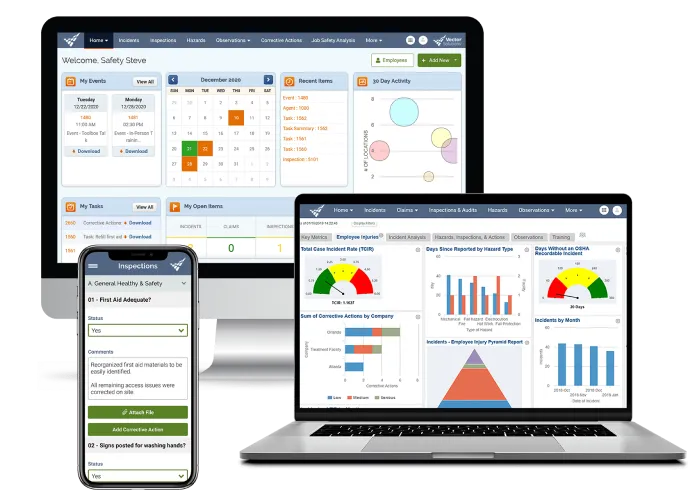
FAQs about compliance training best practices
How do you measure whether compliance training is actually working?
Track four levels of impact. Completion rates and assessment scores confirm training happened. Behavioral observation and incident reduction confirm knowledge transferred to the job. Audit outcomes and penalty avoidance confirm the program reduced risk. Most programs stall at Level 1 and 2. Only 37% track misconduct trends post-training, per LRN. Levels 3 and 4 prove the program is working.
What events should trigger compliance training beyond the annual cycle?
Six events should trigger retraining:
- Regulatory changes (assign affected modules within 30 days of the rule’s effective date)
- Role changes or promotions (enroll on the date the change takes effect)
- Safety incidents or violations (targeted retraining within 48 hours for the involved team and similar roles)
- Audit findings
- New equipment or processes
- Onboarding
Each trigger needs a defined completion timeline. Close the gap before risk builds up.
How do you deliver compliance training to frontline workers who don’t sit at desks?
Use mobile-first modules that work offline. Deploy kiosk-based training at shift check-in stations. Schedule training in 5–10 minute blocks during shift overlaps or pre-shift briefings. Sixty-two percent of deskless workers have limited computer access during the workday. And 56% work irregular schedules, according to SHRM. Target 95%+ completion within the compliance window. Use automated escalation for overdue assignments.
What technology do you need to run an effective compliance training program?
Look for a platform with these features:
- Mobile and offline access
- Automated recertification tracking
- Role-based training path assignment
- Real-time reporting
- Structured audit exports with 3–7 year retention
- Integration with EHS systems so incidents trigger retraining
Seventy-eight percent of compliance programs now use purpose-built training technology, according to NAVEX. Spreadsheet tracking is an audit liability your peers have already removed.
How long should you keep compliance training records?
Keep completion logs, policy acknowledgments, and assessment scores for 3–7 years. The exact period depends on your industry and regulatory requirements. OSHA generally requires three years. State regulations and insurance audits may require longer retention. Structured audit exports (CSV or PDF with timestamps, user IDs, and completion status) are required for external audits. Verify the specific retention period with your legal or compliance team.