A training management system tailored for the fire service—track all training, EMS recerts, skill evaluations, ISO, and more for 100% of training in one place.
A training management system tailored for EMS services—EMS online courses for recerts, mobile-enabled skill evaluations, and more for 100% of training in one place.
Increase performance, reduce risk, and ensure compliance with a training management system tailored for your FTO/PTO and in-service training for 100% of training in one place.
Integrated solution purpose-built for modern regulatory demands. ArdentSky, delivers automated, integrated compliance solutions trusted by global gaming manufacturers, operators, and suppliers.
Accurate OSHA 300A recordkeeping helps organizations identify potential hazards, track trends in injuries and illnesses, and implement safety enhancements to prevent future incidents. It is especially important for high-risk industrial industries and construction.
A critical form for recordkeeping is the OSHA 300A Log. This document summarizes a year’s worth of occupational incidents. In this comprehensive guide, we will cover the essentials of OSHA 300A Logs, from what information they entail to who is responsible for posting them.
What is the OSHA 300A Log?
An OSHA 300A Log is an annual summary of all OSHA recordable incidents. It is a required form under the Occupational Safety and Health Administration (OSHA) regulations, specifically for employers who must keep records of work-related injuries and illnesses.
Companies are required to post their OSHA 300A Log in a visible area, such as a break room, from February 1 to April 30 so that employees can review it.
What Information Must be Recorded on the OSHA 300A Log?
OSHA requires that specific information be provided to employees on this log, including:
Total number of OSHA recordable incidents
Total number of hours worked
Total number of missed and restricted days
Injury and illness types
Identifying company data
This data helps organizations understand the nature and extent of workplace injuries and illnesses. It also aids in devising targeted strategies for incident prevention and mitigation.
What are some of the most common OSHA 300A Mistakes?
Businesses can make errors when completing or submitting their OSHA 300A form. To help avoid these issues, organizations often rely on safety resources and platforms like Vector EHS, which supports accurate recordkeeping and streamlines compliance.
Keep these common compliance mistakes in mind when working with the OSHA 300A form:
Missing the posting deadline: The OSHA 300A summary must be visibly posted from February 1 through April 30 each year.
Failing to submit electronically: Employers required to submit electronically sometimes overlook this step or miss the March 2 deadline.
Using incorrect totals: Mistakes in adding up cases, missed workdays, or injury types can lead to inaccurate reporting.
Leaving sections blank: Omitting required fields, such as establishment information or executive certification, can result in noncompliance.
Posting an uncertified form: The 300A must be reviewed and signed by a company executive before it is posted or submitted.
What is the Difference Between the OSHA 300A Form and Other OSHA Recordkeeping Forms
The OSHA 300A form is a year-end summary of workplace injuries and illnesses. OSHA Forms 300 and 301 provide detailed, case-specific records used to generate that summary.
OSHA Form 300A plays an important role in summarizing workplace injuries and illnesses, and it interacts with other OSHA forms as follows:
OSHA Form 300: This form records all work-related injuries and illnesses throughout the year. It serves as the detailed log from which the annual summary on the OSHA 300A Form is derived.
OSHA Form 301: This form provides detailed information about each individual work-related injury or illness. It is used to document specific incidents and supports the data recorded on Form 300.
Understanding how the OSHA 300A form differs from and connects to the 300 and 301 forms is important knowledge for meeting OSHA 300A posting requirements and maintaining accurate records.
Does My Company Need to Post the OSHA 300A Log?
If you have 11 or more employees, you are generally required to maintain and post the OSHA 300A Log.
If your company had ten or fewer employees at all times during the previous calendar year, or you are classified as a partially exempt industry, you do not need to post the OSHA 300A Log unless you have been asked in writing to do so by OSHA or the Bureau of Labor Statistics.
Remember! Even locations that do not have any OSHA recordable incidents are still required to post their OSHA 300A Logs.
Who is Authorized to Post an OSHA 300A Log?
It’s common for companies to be unsure about who is responsible for posting and maintaining accessibility of the form for staff. OSHA rules dictate that the responsible party should be a company executive. According to The National Law Review, there are four main criteria for determining who is a company executive:
An owner of the company (only if the company is a sole proprietorship or partnership);
An officer of the corporation;
The highest-ranking company official working at the establishment; or
The immediate supervisor of the highest-ranking company official working at the establishment.
If you’re an employer subject to OSHA’s recordkeeping regulations, it’s important to make sure that the responsibility for posting the OSHA 300A form is clearly delineated. This will ensure that the form is posted, helping your company to avoid any possible punitive fines from the agency.
Certifying and Posting an OSHA 300A Log
At the end of each calendar year, you must review the OSHA 300A Log to verify that the entries are complete and accurate, and correct any deficiencies identified.
The OSHA Standard states that: “A company executive must certify that he or she has examined the OSHA 300A Log and that he or she reasonably believes, based on his or her knowledge of the process by which the information was recorded, that that annual summary is correct and complete.”
Organizations that meet OSHA’s electronic submission requirements must upload their 300A summary of the previous calendar year to OSHA’s Injury Tracking Application before March 2nd.
In 2023, OSHA published a Final Rule that revised the recordkeeping regulation to require certain establishments with 100 or more employees in high-hazard industries, which were already required to submit information from the OSHA Form 300A Annual Summary, to also submit information from the OSHA Form 300 Log and the OSHA Form 301 Incident Report.
EHS Management Software
Bring your organization’s EHS activities, tasks, and reports into one single, easy-to-use solution
Quick Checklist of Frequently Asked Questions about OSHA 300A Logs
1. What new electronic reporting requirements took effect in 2024?
The OSHA final rule, effective January 1, 2024, requires establishments in designated high‑hazard industries with 100 or more employees to electronically submit data from OSHA Forms 300 and 301 to OSHA annually, in addition to the previously required 300A summary submission.
2. What is OSHA 300A?
The OSHA 300A is a summary of work-related injuries and illnesses recorded throughout the year. It includes totals from the OSHA 300 log and must be posted annually in a visible location to meet OSHA recordkeeping requirements.
3. Who must file the OSHA 300A form?
Most employers with 11 or more employees in industries covered by OSHA recordkeeping rules are required to complete and post the OSHA 300A form. Some low-risk industries are exempt unless specifically requested by OSHA or the Bureau of Labor Statistics.
4. When is the OSHA 300A posting period?
The OSHA 300A log must be posted from February 1 through April 30 of the year following the recorded incidents. This is part of the OSHA 300A posting requirements and helps maintain workplace transparency.
5. How do I complete the OSHA 300A log?
To complete the OSHA 300A form, an employee, such as a safety manager, summarizes key data from the OSHA 300 log. In the form, the safety manager documents total cases, days away from work, and types of injuries. Next, a company executive must certify the form before it’s posted.
6. What’s the difference between OSHA 300, 300A, and 301?
The OSHA 300 log tracks workplace injuries or illnesses. The OSHA 301 form provides detailed incident reports for each case. The OSHA 300A form summarizes the total data from the 300 log. This form is required to be publicly posted. Vector EHS compliance software automates this process by generating the OSHA 300, 300A, and 301 forms from your incident reports, which helps reduce errors and save time.
Enhancing OSHA Compliance with Digital Tools
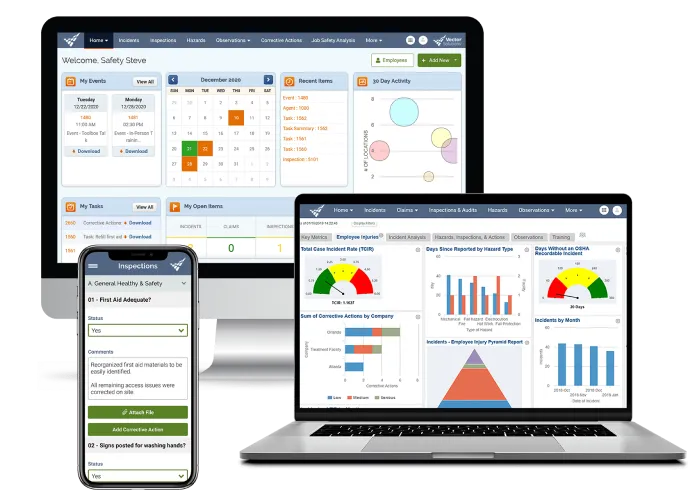
Leveraging digital tools and safety management software can significantly streamline the process of managing and submitting the OSHA 300A Summary. Solutions like Vector EHS Management connect all areas of safety into one easy-to-use platform. Users can easily generate regulatory reports (OSHA forms 301, 300, 300A) and export data to CSV files for quick and simple electronic submission of recordkeeping data.
Instantly determine if a case is recordable and reportable.
Automatically populate forms with required info.
Easily track lost time resulting from incidents.
Manage complex organizational structures.
Manage your entire environmental health and safety program in our configurable system to save time and improve efficiency in your safety department with Vector EHS Management.