September 2, 2026 4 min read

Compliance Monitoring Tools: 12 Platforms and How to Choose
Industry:
Solution:
Certification deadlines live in one spreadsheet. Inspection records sit in another. Training data hides in your LMS. Then an auditor asks for all of it at once. Proving readiness means chasing records across teams. By the time you pull it together, you’ve spent hours you didn’t have.
Compliance monitoring tools promise to fix that. They offer central tracking and alerts. But most platforms serve IT and cybersecurity teams. They often skip the daily work of operations teams. That includes training, certification renewals, inspections, and safety tasks.
Compliance monitoring covers both cybersecurity controls and workforce compliance. When you match your tools to real workflows, you close real gaps. You also spend far less time building audit reports from scratch.
Main Takeaways
- Compliance monitoring tools fall into four groups: IT/cloud security, GRC platforms, workforce/training tools, and EHS/safety tools.
- Most teams need tools from more than one group. Compliance workflows and risks vary by department.
- IT-focused platforms often miss workforce compliance needs like certification tracking, inspection logging, and training renewals.
- Integration depth decides one thing: does the platform collect evidence on its own, or does it just give your team another place to store data by hand?
- The right tool depends on your team’s size, industry obligations, and how much compliance work you can automate.
What to Look for in Compliance Monitoring Software
A compliance monitoring tool should automate the daily work of proving readiness. That means tracking obligations, collecting evidence, and flagging gaps early. The right platform builds audit-ready reports across IT, regulatory, and workforce compliance. Your team spends less time chasing records. You spend more time closing real gaps.
Core Capabilities Every Platform Needs
- Central dashboards. One view of controls, training data, certification dates, and inspection results. Compliance data only helps when you can see it in context. A dashboard gives you that context.
- Audit-ready reporting. Auditors expect timestamped evidence and exportable audit trails. They also want role-filtered views that show exactly what they ask for. Your team shouldn’t rebuild reports from raw data every cycle.
- Deadline alerts. Early warnings for certification renewals, inspection due dates, and policy attestation cycles. Task workflows should send corrective actions to the right owner. No one should have to follow up by hand.
- Alerts that cover both sides. IT tools flag control drift and configuration changes. Operational compliance needs alerts too: overdue training, failed inspections, and open incident follow-ups. A tool that covers only one side leaves gaps on the other.
Capabilities That Separate Good Tools From Adequate Ones
- Deep system integrations. Compliance data lives in your HRIS, LMS, cloud systems, and EHS platforms. When a monitoring tool can’t pull from those systems, your team must re-enter data by hand. That creates errors and weakens your audit position. Nearly 48% of compliance pros say they struggle with evidence gathering, according to Hyperproof’s 2025 IT Compliance Benchmark Report. Integration depth is what separates a strong tool from a weak one. A strong tool collects evidence on its own. A weak tool just stores what you type in.
- Mobile access. Field teams run inspections and safety checks away from a desk. They need mobile access to do that work.
- Role-based permissions. Give site managers, compliance leads, and auditors the right data. Not everyone needs to see everyone’s data.
- Per-person training tracking. This goes beyond assigning a course. The platform should track training for each person. It should also auto-assign refresher courses before certifications lapse.
- Inspection evidence logging. Photo and signature evidence should tie to each inspection result. It should log in the system, not sit in a separate file. Most IT-focused platforms miss this completely.
For teams in construction, utilities, healthcare, and public safety, this gap matters most. Workforce and safety obligations drive daily risk.
Build a Compliance Training Program That Proves Results
Moving from annual checkboxes to continuous, event-driven training takes a clear framework. These eight practices show you exactly how to close the gap between completion rates and real risk reduction.
Read the Compliance Training Best Practices Guide
The Best Compliance Monitoring Tools, Grouped by What They’re Built for
Compliance monitoring tools split into four groups. Most organizations end up using tools from more than one group.
IT/Cloud Security Tools
Tools like Prisma Cloud, AWS Security Hub, and SentinelOne monitor cloud setups and endpoints. They map findings to frameworks like PCI DSS, CIS Benchmarks, and NIST. These tools are built for engineering and security teams. They aren’t built for field operations. AWS Security Hub works best for teams running mainly on AWS. Prisma Cloud covers multi-cloud setups.
New PCI DSS v4.0 rules became required on March 31, 2025. This raises evidence demands for any tool that serves merchants or payment processors, according to the PCI Security Standards Council.
GRC Platforms
Platforms like Drata, Vanta, Sprinto, Hyperproof, Secureframe, OneTrust, and AuditBoard automate evidence collection. They also map controls to frameworks like SOC 2, HIPAA, and GDPR. These tools serve SaaS companies and large enterprises. They work well for any team managing several overlapping frameworks at once, from mid-market startups to large regulated organizations.
Workforce and Training Tools
These tools track completions, certifications, and renewal deadlines across a spread-out workforce. They’re built around people and schedules, not infrastructure or controls. Cornerstone OnDemand is the common enterprise example. It handles course assignment, completion tracking, and reporting at scale. Like most talent-focused platforms, it’s built for corporate learning paths. Certification renewals tied to field roles, and the site-level compliance evidence auditors ask for, sit outside its core.
EHS and Safety Tools
These tools connect field inspections, incident reports, and corrective actions. They matter most in industries where physical risk drives daily compliance work. Vector Solutions covers both this group and workforce/training. It serves over 24,000 clients and 31 million users across workforce training and EHS safety compliance. The LMS tracks training and certification deadlines. It auto-assigns renewals, so a lapsing certification triggers a refresher course before it becomes a gap. The EHS platform connects inspections, incidents, and corrective actions through real-time dashboards and alerts. A failed inspection routes straight to an owner and a deadline. It doesn’t sit in a separate system.
OSHA’s 2024 electronic submission rule applies to high-hazard workplaces with 100 or more employees, as outlined by OSHA’s high-hazard reporting rule. Because of this rule, EHS tools need structured incident data fields. They also need API-ready exports.
The first two groups are built for teams managing digital infrastructure. The last two are built for teams managing physical workplaces and a spread-out workforce. That split is exactly where most compliance monitoring tools fall short. Few tools cover both sides well.
How to Choose the Right Compliance Monitoring Tool for Your Organization
The right compliance monitoring tool depends on three factors. First, your team’s size and compliance resources. Second, the industry obligations you must track. Third, whether you need full automation, a lighter tool with internal processes, or a hybrid approach.
By Size and Resource Level
Small and mid-sized teams with limited staff should look for guided setup. Pre-built framework templates and automated evidence collection matter most. One person can’t keep audit trails for several regulations by hand. There’s no time left to do the real work those regulations require.
A 2025 study from PwC’s Global Compliance Survey found that 82% of teams plan to increase compliance technology spending. But teams with limited staff need the fastest path to value. That means fewer setup steps and more out-of-the-box automation.
Larger teams with multi-site operations face a different challenge. They need role-based access, so site managers see only their own location’s data. They also need dashboards that pull every department into one compliance view. Deep integration with your HRIS, LMS, EHS, and cloud systems matters a lot. Without that depth, compliance monitoring just becomes another silo.
Build, Buy, or Hybrid
Three models exist for compliance monitoring. In-house processes with spreadsheets and manual reviews can work for very small teams. These teams track one framework with rare deadlines. A dedicated platform automates evidence collection, deadline alerts, and reporting. It removes the manual work that slows most teams down.
A hybrid approach pairs a platform with third-party audit support or consulting. This works for complex, multi-framework settings where internal knowledge alone falls short.
The decision comes down to where your team spends its time. A 2025 benchmark from Hyperproof’s benchmark report found that 52% of compliance pros spend 30 to 50% of their time on admin tasks. If your team spends that much time on manual work, automation pays for itself fast. Your team can focus on cutting risk instead of assembling records.
Teams in construction, utilities, public safety, and healthcare face an added layer. Workforce and EHS obligations like certification tracking, OSHA reporting, and inspection scheduling often need a specialized tool. A GRC system that maps SOC 2 controls won’t track whether a crane operator’s certification expires next month. It also won’t flag whether last week’s inspection led to a corrective action. Matching your tools to these workflows keeps you audit-ready between cycles.
Connect Inspections, Incidents, and Audits in One Platform
Teams in construction, utilities, and public safety need EHS workflows that link field inspections to corrective actions and safety audits. See how Vector EHS handles that connection across every site.
Explore Vector EHS Audit Software
Put Your Compliance Monitoring Strategy Into Action With Vector Solutions
You now have a framework for judging compliance monitoring tools by group. You can match platforms to your team’s size and regulatory needs. You can also decide whether to automate fully, add internal steps, or blend both. Each choice works best when it’s based on the compliance work your team does every day.
We built Vector Solutions to bring compliance monitoring into that daily work. Across 24,000+ clients and 31 million users, our platform tracks employee training and manages certification renewals before they lapse. It also connects inspections, incidents, and safety audits through real-time dashboards and timestamped evidence. Every location runs the same requirements on the same schedule. You prove audit readiness with data that’s already there.
Stop Rebuilding Audit Reports From Scratch Every Cycle
When certification renewals, inspection records, and training completions live in separate systems, audit prep eats hours your team doesn't have. Vector centralizes that data and keeps it current automatically.
Request a Demo Today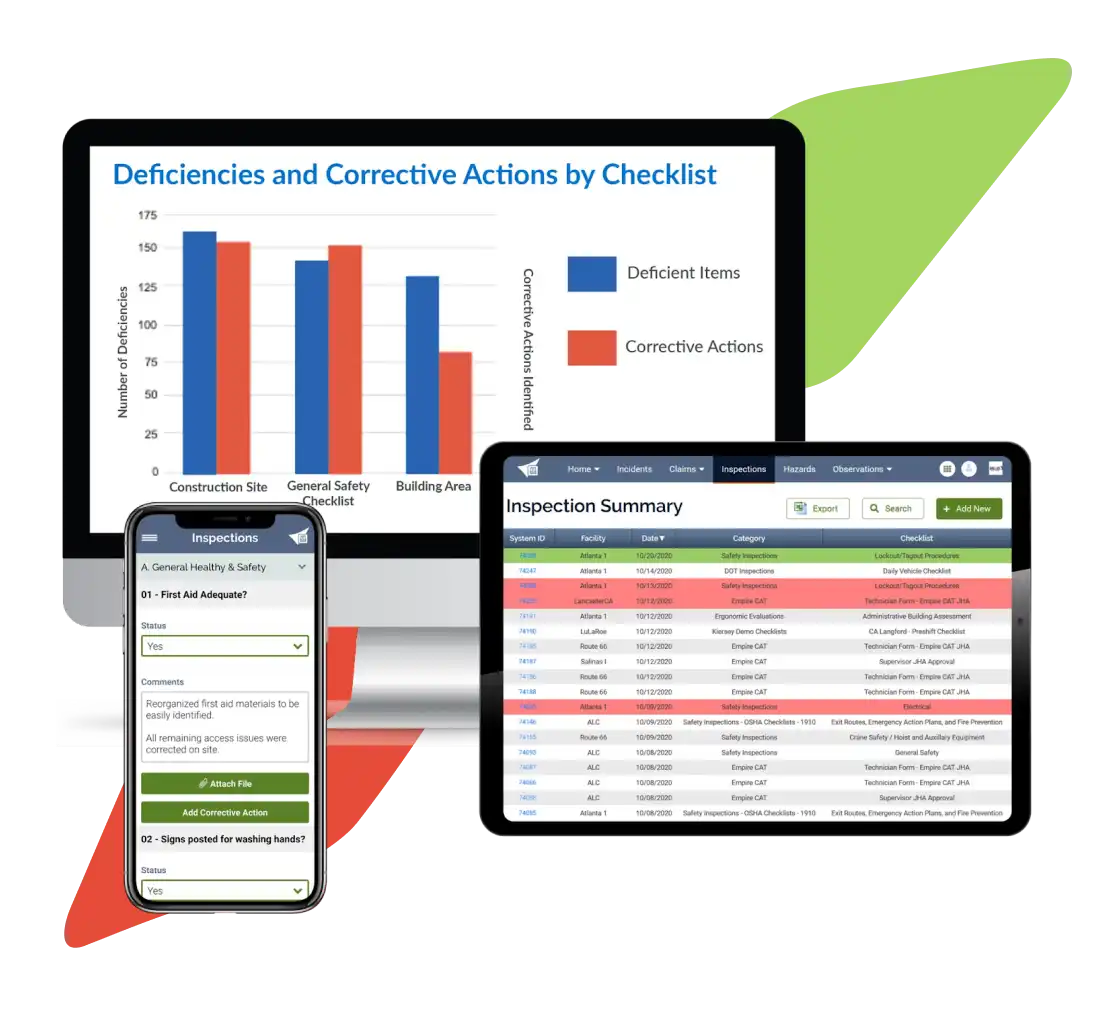
FAQs About Compliance Monitoring Tools
What Are the 5 Pillars of a Compliance Program?
The five pillars of a compliance program are:
- Written standards and procedures
- Designated oversight and accountability
- Effective training and communication
- Monitoring and auditing systems
- Enforcement through incentives and discipline
Each pillar supports the others. Policies without training fail. Monitoring without enforcement creates false confidence. These pillars align with federal sentencing guidelines. They’re recognized across OSHA, DOJ, and other regulatory frameworks.
How Do I Know if My Compliance Monitoring Tool is Actually Working?
Track five metrics:
- Training completion rates (target 95% or higher on time)
- Overdue certifications (zero at audit time)
- Average audit prep time (dropping quarter over quarter)
- Inspection pass rates
- Incident response time from alert to closure
Pull these from your platform’s dashboard. If you’re figuring them out by hand, the tool isn’t automating what it should. Compare results against your own baseline from six months prior.
Can I Use One Compliance Monitoring Tool for Both IT Security and Workforce Safety Obligations?
Most platforms focus on either IT/cloud security or workforce and operational compliance. The data, workflows, and evidence needs differ too much for one tool to cover both well. Teams managing both areas often need two tools. A hybrid setup that connects a GRC platform with an LMS or EHS system also works. Linking the two needs API connections and clear rules for who owns what data.
What Happens if My Compliance Monitoring Tool Doesn’t Integrate With Our Existing HRIS or LMS?
Without integration, you have to enter data by hand to keep employee records, training data, and certifications current. That creates errors and slows down audit readiness. It also cancels out the automation you paid for. CSV uploads bring version-control problems too. They raise the risk of missing a certification expiration. Ask vendors for integration docs. Test the data sync during your trial period before you sign.
Do Small Organizations With Fewer Than 50 Employees Need a Compliance Monitoring Tool, or Can We Manage It Manually?
If you track only one or two simple obligations with rare deadlines, spreadsheets may work fine. But once you manage employee certifications, repeat inspections, or safety obligations across sites, a lightweight tool saves real time. It builds audit-ready evidence faster than manual tracking. The tipping point comes when one person spends more than a few hours a month chasing records.
Small teams in construction, healthcare, and utilities face the same regulatory oversight as larger ones. That means the same admin burden larger teams report. Waiting for more headcount before you automate usually costs more than it saves.