September 3, 2026 4 min read

Compliance Tracking and Reporting Across Your Workforce
Industry:
Solution:
Training deadlines, certification renewals, safety inspections, policy acknowledgments. They’re all tracked somewhere. The problem is “somewhere” usually means a spreadsheet here, a shared drive there, and tools nobody trusts. Compliance gaps don’t announce themselves. They surface when the auditor walks in.
Compliance tracking and reporting spans every department that touches a regulated obligation. Most organizations treat it as a back-office task. They pay for that mistake when it counts most.
Organizations that build compliance tracking across workforce training, safety, and cross-department ownership close gaps before audits. They respond faster when regulators ask. That’s what a connected system makes possible.
Main Takeaways
- Compliance tracking spans every department with a regulated obligation.
- Every compliance report should answer four questions: what was required, what was completed, what is overdue, and who owns the gap.
- Five key metrics turn compliance activity into a status you can defend to auditors.
- Every obligation needs a measurable control, a named owner, and a set review schedule.
- Continuous control monitoring flags overdue items in real time, so periodic reports stay accurate.
What Is the Compliance Reporting Process?
The compliance reporting process is a set cycle. You collect evidence, sort it by audience, and deliver reports on schedule. Evidence includes training records, inspection results, incident data, and policy acknowledgments. Each report serves a specific audience. Internal leaders review progress. Regulators check that your organization meets its obligations.
Internal compliance reporting gives department heads and compliance leads a clear view of what’s on track. These reports take the form of dashboards or summary views. They highlight overdue training, open corrective actions, and completion trends.
External compliance reporting serves a different purpose. It covers audit packets, regulator submissions, and third-party disclosures. Each one proves your organization met specific requirements by a specific deadline. Both types use the same data. But format, detail, and stakes differ.
Periodic reporting only works when continuous control monitoring feeds current data into each report. A weekly dashboard refresh and an annual filing both need live inputs. A quarterly review built on three-month-old exports only tells you where you used to be.
Report Types, Cadence, and Core Fields
Every compliance report answers four questions: what was required, what was completed, what is overdue, and who owns the gap. The table below maps common report types to their cadence, audience, and key data fields.
OSHA’s expanded annual e-reporting rule covers sites with 100 or more employees in certain industries. Reports are due each year by March 2. They require validated data from every covered location (OSHA’s e-reporting rule).
| Report Type | Cadence | Audience | Core Fields |
| Internal status dashboard | Weekly or monthly | Department heads, compliance leads | Training completion rates, overdue items, open corrective actions |
| Audit-readiness packet | Quarterly or pre-audit | Internal audit, external auditors | Evidence logs, policy acknowledgments, inspection records, finding closure status |
| Regulatory submission | Annual or as required | Regulators (OSHA, state agencies) | Incident data, injury/illness logs, certification records |
| Executive summary | Quarterly | C-suite, board | Compliance status by department/location, trend data, risk exposure |
KPIs to Measure Your Compliance Program’s Results
Your compliance status comes down to one question: does your program produce results, or just activity? A small set of KPIs can answer that. They measure completion, response speed, and follow-through across your workforce.
Most organizations already have tools to collect compliance data. A 2024 survey found that 76% use purpose-built technology for compliance training. Yet 41% rate their ability to measure training impact as poor or fair (NAVEX’s 2024 compliance benchmark report). That gap is where KPIs come in.
The five metrics below turn raw compliance data into a status you can defend. Leadership, auditors, and regulators all expect this level of proof.
| KPI | What It Measures | How to Calculate | Why Leadership Cares |
| Regulatory Compliance Rate | Percentage of relevant requirements met across the organization | (Requirements met ÷ total requirements) × 100 | Shows overall program health at a glance |
| Training Completion Rate | Percentage of assigned training completed on time by role, department, or location | (On-time completions ÷ total assignments) × 100 | Identifies departments or roles falling behind on required courses |
| Incident Response Time | Average time from incident report to first corrective action | Sum of response times ÷ number of incidents | Signals whether safety issues are addressed before they escalate |
| Audit Findings Closure Rate | Percentage of audit findings resolved within a defined SLA | (Findings closed on time ÷ total findings) × 100 | Measures follow-through after audits |
| Policy Acknowledgment Rate | Percentage of workforce that has reviewed and acknowledged current policies | (Acknowledgments received ÷ total required) × 100 | Confirms employees know current requirements, reducing “I didn’t know” gaps |
Together, these five metrics turn compliance activity into a status you can defend. Each one ties to evidence your auditors and regulators already expect to see.
Know What Your Compliance LMS Must Deliver
Certification expiry tracking, automated reminders, and audit-ready reporting are baseline requirements in regulated settings. This guide breaks down exactly what to require from any platform you evaluate.
Read the Compliance LMS Buyer's Guide
How to Build a Compliance Tracking Plan Across Your Workforce
A compliance tracking plan is a repeatable system. It connects every obligation to an owner, a control, a tool, and a review schedule. Built right, it grows as you add people, locations, and requirements.
Step 1–3: Identify Obligations, Map Controls, and Assign Owners
Start by listing your obligations. Note every regulation, standard, and internal policy that applies to your organization. Break them down by department, role, and location. This is framework mapping. It means connecting external requirements like OSHA recordkeeping, state privacy laws, and industry certifications to controls you can monitor. As of 2026, 20 state privacy laws are now in effect. That makes multi-jurisdiction mapping a must for any organization working across state lines (MultiState’s state privacy law tracker).
Once you have the list, map each obligation to a measurable control. A control is the action that proves compliance. It might be a completed training module, a passed inspection, a signed policy acknowledgment, or a renewed certification. If you can’t measure it, you can’t track it.
Then assign an owner to every control. Ownership means one person watches status, escalates overdue items, and reports results. Without clear owners, gaps hide until audit day.
Step 4–5: Select Tools, Set Cadence, and Scale
Choose a compliance tracker that connects your data. You may need:
- A standalone compliance tracking platform
- An LMS for training and certification tracking
- An EHS system for inspections and incidents
- A connected platform that spans all three
When you compare compliance software companies, focus on one thing: does the tool automate reminders, collect evidence, and feed your reporting process? Budget pressure makes this more urgent. Internal audit functions reporting budget cuts rose from 11% to 19% between 2024 and 2025 (The IIA’s 2026 internal audit report). Automation and system combining have become practical needs, not nice-to-haves.
Set a review cadence for every control. Use daily checks for safety observations, monthly checks for training completions, and quarterly checks for audit-readiness reviews. Build continuous control monitoring into that cadence instead of treating it as a separate project. That way overdue items surface as they happen, not at the next scheduled check.
Compliance tracking works across your entire workforce. Here’s how it looks in practice:
- A healthcare system tracks HIPAA training by role across 12 facilities.
- A fire department monitors EMT certification renewals with 90-day alerts.
- A manufacturer runs quarterly safety inspections at every plant.
- A school district confirms annual policy acknowledgments before school starts.
Vector Solutions connects training, safety, and compliance tracking across departments. Vector LMS handles training assignments and reminders. Vector EHS covers inspections and incidents. Compliance status rolls up in one place.
Connect Training Records and Safety Data in One View
When training completions and incident data sit in separate systems, compliance gaps stay hidden. Vector EHS dashboards bring training status, inspections, and incident data into one real-time view, so overdue items surface immediately instead of waiting for the next manual pull.
Explore Vector EHS Dashboards
A five-step plan gives you a repeatable structure. But it only holds up if every obligation has an owner, every control has a cadence, and your compliance tracker connects the data.
Start Tracking Compliance Across Your Workforce with Vector Solutions
You now have a framework for identifying obligations, mapping controls, and assigning ownership. You also know how to pick tools and build reports that satisfy auditors before gaps become findings.
The fastest organizations treat tracking as a day-to-day habit. They own it across departments.
We built Vector Solutions to connect training, safety, and compliance tracking in one platform. Your workforce stays current on requirements, and you can prove it with real-time data. Every location runs the same compliance plan. You report status across departments without chasing spreadsheets.
Replace Spreadsheets with Audit-Ready Compliance Data
When a manufacturer needs quarterly safety inspections tracked across every plant, a connected platform keeps every location on the same compliance plan with real-time status you can prove.
Request a Demo Today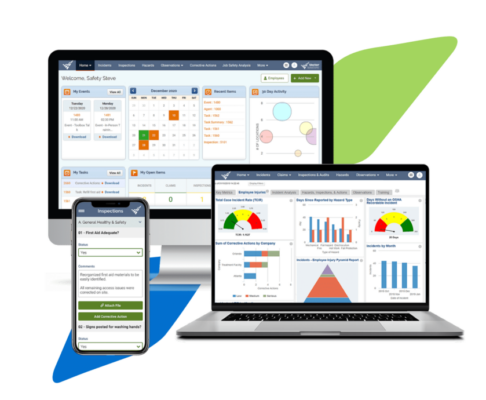
FAQs About Compliance Tracking and Reporting
What Is the Difference Between Compliance Tracking and Compliance Reporting?
Compliance tracking is the ongoing process of watching obligations in real time. It covers training completions, certification renewals, inspection results, and policy acknowledgments. Compliance reporting is the periodic delivery of that evidence. Reports go to internal leaders, auditors, or regulators on a set schedule. Tracking feeds reporting. You can’t report well without ongoing monitoring.
How Do I Know if My Organization Needs Compliance Tracking Software or if a Spreadsheet Is Enough?
You’ve outgrown spreadsheets if you manage compliance across multiple departments, locations, or regulatory frameworks. The same is true if overdue items only surface when someone asks. Software helps when you need cross-department visibility, automated escalation, or audit-ready evidence on demand. Spreadsheets work fine for small, single-location teams. They break down fast as scope grows.
Can I Use the Same System to Track Workforce Training and Safety Inspections?
Yes. Vector Solutions connects training tracking through Vector LMS with inspection and incident data through Vector EHS. Compliance status rolls up in one dashboard. Separate systems can work too, if they integrate well. A connected platform cuts manual reporting and duplicate data entry. Look for systems where training records, inspection results, and corrective actions share one reporting layer.
What Happens if an Employee Misses a Compliance Training Deadline?
The immediate risk is a compliance gap found during an audit or incident review. Next steps depend on the type of training missed. Role-based requirements, certification renewals, and regulatory deadlines each carry different documentation rules. Automated tracking systems flag overdue items and escalate to managers early. Document the miss. Assign a makeup deadline. Confirm completion to close the loop.
How Often Should I Run Compliance Status Reports for Leadership?
Internal compliance dashboards should update weekly or monthly. That lets department heads address overdue items before they escalate. Executive summaries typically run quarterly. They show trends, risk exposure, and program results across locations. Regulatory submissions follow fixed deadlines. OSHA’s annual Form 300A is due March 2 each year. Those reports run on a compliance calendar.